

One of the most common upgrade questions we see out there is asking what’s new, what’s different, what’s better, what’s changed between Adobe CS6 and CS5.5 or CS5? Or more fundamentally, what are the key new features in CS6 versus prior versions, even compared to CS4 or CS3?
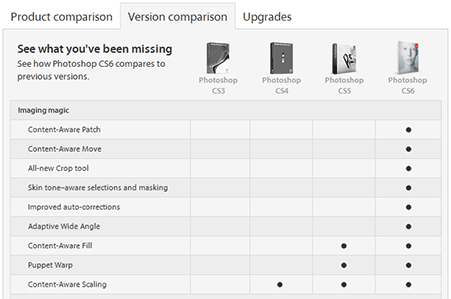
Creative Suite 6 contains hundreds of new or enhanced features and functions across the 14 point products that comprise it. So the easiest way to look at it is by major product… For example, Photoshop CS6 Extended has 62% more new features added in this cycle compared to the previous one, and nearly twice as many JDI requests (user-focused “Just Do It” items) addressed. You’ll find the details on these linked from the table below.
Adobe turns 30 this year. Over the decades the company has excelled at creating software that abstracts the latest technology in a way that makes it easy for customers to express unique ideas and deliver those ideas in a variety of media. Whether you’re editing an image with Photoshop, creating vector graphics in Illustrator, or laying out a page in InDesign, the goal of Creative Suite 6 is to give you total creative freedom along with the control and precision to ensure the highest quality when it comes to production. And when you combine the new time-saving features in CS6 together with the major reengineering of key user interfaces – in particular Photoshop, Illustrator, and Premiere Pro – plus further deep optimization of tool performance, you should be able to get that work done faster and more efficiently.
Special: Legally download dozens of free Adobe books for a limited time!
So here they are, the new feature breakouts by individual product – the CS6 vs. CS5.5 vs. CS5 vs. CS4 vs. CS3 version comparisons:
| What’s New in Adobe Creative Suite 6 | ||
|---|---|---|
| Product | At-a-Glance | In Depth |
| Photoshop CS6 | Version Comparison | New Features |
| Photoshop CS6 Extended | Version Comparison | New Features |
| Illustrator CS6 | Version Comparison | New Features |
| InDesign CS6 | Version Comparison | New Features |
| Dreamweaver CS6 | Version Comparison | New Features |
| Fireworks CS6 | Version Comparison | New Features |
| Flash Professional CS6 | Version Comparison | New Features |
| Flash Builder 4.6 | Version Comparison | New Features |
| Premiere Pro CS6 | Version Comparison | New Features |
| After Effects CS6 | Version Comparison | New Features |
| Audition CS6 | Version Comparison | New Features |
| Encore CS6 | Version Comparison | New Features |
| Creative Suites | ||
| CS6 Design Standard | Version Comparison | New Features |
| CS6 Design & Web Premium | Version Comparison | New Features |
| CS6 Production Premium | Version Comparison | New Features |
| CS6 Master Collection | Version Comparison | New Features |

See also our Creative Suite 6 Launch Guide plus a focused comparison of CS6 vs. CS5.5, including specific details on all the new features added product-by-product.
See Also

- The 10 most common myths about Creative Cloud
- Don’t miss Adobe’s current specials and promotions
- Download free Adobe books (choose over 30 titles)
- Free Adobe CS6 Tutorials – 30 hours of video training
- How to save 60% with the Adobe education editions
- Free Adobe Stock! Download 1,000,000+ top images
Keep up with the latest on Adobe software — follow us on Facebook or Twitter, or subscribe to our RSS feed… You can also enter your email and have new articles sent directly to your Inbox. We are reader-supported; when you buy through links on our site, we may earn an affiliate commission.






Hi guys,
In the office we have Adobe Premiere CS4 and the manager here wants to get me onto a Premiere Pro course so we can do some video editing but as expected, these training establishments are upgrading to CS6.
My question is, how much difference is there in terms of functionality and performance between the two?
If there isn’t that much in terms of how to use the respective applications then there won’t be a problem going on this course, but there is a worry that if I do go on a CS6 course then I might struggle if I go back to using the older version etc.
I have asked some of these training establishments in advance and their opinions vary. Some say that we really should upgrade, another one emailed me back saying that there was no real difference between the two in the way they are used etc, with the menus and functionality.
I just need to be clear on this.
Thanks in advance.
br
Welcome Keith, thanks for your questions. In actuality, there is a huge, huge difference between Premiere Pro CS6 vs. CS4. Creative Suite 4 software is four years old now, and there have been three major versions since then (CS5, CS5.5, and now CS6)…
For Premiere CS6 in particular, Adobe completely updated the user interface from CS5.5, in a good way – it’s more efficient and easier to use now, with intuitive controls that put the video front-and-center.
Premiere Pro CS6 also delivers much, much better performance than CS4 because it became a 64-bit-only application when CS5 came out.
The tables linked from the article above will give you some idea of all the features and other differences between the two versions. And here is another article that may help:
What’s New in CS6: Premiere Pro, After Effects & Audition Features
So bottom line – yes, both versions are video editors but they are much different after four years, and you may be better off taking a course based on a free trial version of CS6, and then seeing if you can finagle an upgrade somehow.
Lastly, here are some good (and free) resources for learning CS6:
Download Free Adobe CS6 eBooks — 1,022 Pages of New Tutorials
New Adobe CS6 Video Tutorials – 30 Hours of Free Online Training
Hope that answers your questions!
I work at a large university on CS5 where I have to oversee design projects that are done by outside vendors. I constantly get requests asking me to save down Illustrator files to CS3. Not only is this time-consuming, it’s hard to believe that some people still use CS3.
What would be the best reason(s) for telling these vendors that upgrading to CS6 is best? Other than the fact that the vendors agreed to keep their software current if they are doing business with us.
Thanks.
Greetings Andreas, thank you for your comments. Illustrator is actually one of the easier ones – it can be more challenging to save down to older versions in other Creative Suite tools… and in all cases you are probably going to lose features when you save files backwards.
What to say to the vendors you work with? Think about the cost of losing productivity. Time is money – and new features and better performance save time, meaning they often pay for themselves… Try pointing them to articles like the one on this page, and/or:
Adobe CS6 — What’s New and Upgraded for Each Major Product
Mention that if they have older versions like CS3 or CS4, then they only have until the end of this year to upgrade and receive discounted pricing… If they want CS6 or CS7 after December 31, 2012, then it won’t matter that they have an older release – it will cost full price instead!
Lastly, suggest they check out the free trial of CS6 to see how well it works, and over 1,000 pages of free CS6 e-books to get started.
Or if they want all the best Adobe tools with monthly payments instead, Creative Cloud is a new option to consider.
Hope this helps!
My IT Dept recently purchased Adobe CS5.5 Design Premium Win, but didn’t install it on my computer, as the flash drive copy they came with didn’t work. As I went on your web site today to try to install the upgrade, I realize that you now have released version CS6.
As I have not utilized the upgrade version CS5.5 that we purchased, can I go straight to upgrade CS6 from CS4 Design Premium full version?
Finally, I also tried to have them upgrade our old Lightroom 2, but they said that was already included in the Creative Suite, which I do not believe is correct info.
Please advise what to do, as I need to utilize the program soon.
Thank you!
Hi Marie, you should probably contact Adobe directly about that. But you can definitely upgrade directly from CS4 to CS6 – see the different configurations and prices for upgrades.
If you bought that CS5.5 upgrade earlier this year, then you may be entitled to a free further upgrade to CS6, depending on when it was purchased.
If not, then Adobe also has a Refund & Returns Policy that you can look into.
On Adobe Lightroom – it is definitely not included in the Creative Suite – they are complementary products and purchased separately, but you get a 33% discount if you buy them together.
Lightroom is, however, included in Adobe’s new Creative Cloud offering, which has CS6 as well and is membership-based instead of perpetual licensing.
Anyway, if you need to get started with any of these programs right away, then just download the free trials and they will work for 30 days …and you will be able to convert those installations into permanent copies once you receive your serial numbers.
Good luck with it, and feel free to post back if you have any further questions.
I just bought the CS6 version of Master Collection. I currently have CS3 installed.
Can I install CS6 and have both versions running (CS3 and CS6) or should I uninstall CS3?
Hey there TK – that is answered here, towards the bottom:
How Compatible Is Adobe CS6 with Older Versions CS5, CS4, and CS3?
Hi
Can you clarify that Adobe illustrator CS6 will only run on Mac OS 10.6? Will it run on older versions?
Thanks
Peadar
Hello Peadar, you can check Adobe’s official system requirements for Creative Suite 6 on that – as far as we’re aware, Illustrator CS6 requires Mac OS X v10.6 (“Snow Leopard”) or later, but if you have an earlier version there should be no harm in trying to install the free trial download to see what happens.
Hello everyone, I hope somebody can help me. I’m in a dilemma, I have an iMac 4.1 with the processor Intel Core Duo with Mac OS X version 10.6.8 Snow Leopard upgraded, and I have installed InDesign, Illustrator, and Photoshop CS3 – but I want to know which version of Dreamweaver I can install.
Any help will be invaluable to me.
Thanks
Jorge E.
Sure Jorge, just check Adobe’s Dreamweaver System Requirements page for all versions.
Just want to confirm for CS5.5 and CS6, we need not purchase the License separately for WIN and MAC, they can go with both?
Greetings Anil, normally with standard/retail Adobe software, it works on either Windows or Mac OS, but not both. There are a couple ways however to purchase Adobe licenses that will run on and switch between both operating systems…
The first is what are called Business licenses that are part of Adobe’s volume licensing program.
The second is the Creative Cloud, where your membership allows to you to run on any platform or language that you wish, and change flexibly.
There is also now the availability of Creative Cloud for Teams, which does the same thing but for groups of multiple users/seats.
Hope this helps!
What is the difference between CS4 Photoshop to CS6? I have run into a huge problem with my CS4 and now deciding on to spend the money on either an upgrade to CS6 or just purchase CS4 since i am used to using CS4. I am scared that CS6 will be more video editing vs for Photographers.
Thanks
Kelly
No, you needn’t worry about that Kelly – Photoshop CS6 is still very very much for photographers and image editing. The video features are separate and were added on as an extra feature because most folks use cameras now that also support video, so it’s a “one-stop-shop” for all your needs.
Here are all the new features and improvements (such as performance and user interface) in Photoshop CS6 just since CS5 – and it’s a long list, of which video is simply one item.
Your best bet is just to download and run the free CS6 trial and then check out some of the free CS6 ebooks to get started, or the many hours of free CS6 video tutorials.
As for CS4, we definitely do not recommend trying to find/buy older versions of the software that Adobe doesn’t sell anymore, it is fraught with danger.
@ ProDesignTools
Thank you for your response, but I have another problem. The version of CS3 that I have only contains Photoshop, Illustrator, InDesign and Bridge, but does not include Dreamweaver or Flash. And I need at least Dreamweaver. I can install Dreamweaver CS5.5 separately? or I have to buy the full version of CS5.5?
Can it be installed on my iMac? What I can do?
Welcome back Jorge, you can install CS applications separately, they don’t have to be part of a suite, and newer versions of Dreamweaver will work okay together.
However we do not recommend trying to find and buy older versions of Adobe software (like on eBay, Craigslist, etc.) as it’s extremely risky, stick with CS6 direct from Adobe to be safe.
My office is going to purchase Adobe Premiere CS4.0. Do I will have a problem doing video editing with this four years old software using the newer PC? Thanks very much for your help.
Hello Annie, here are Adobe’s official system requirements for Premiere, for versions from CS3 to CS6… But why would you want to buy software from 2008 anyway, especially with a new computer?
Trying to buy old Adobe software generally is dangerous and not a good idea.
Just curious. We have Adobe Premiere CS5.5. The “comparison” chart does not really provide enough incentive to update. Is there a huge difference between 5.5 and CS6 for Adobe Premiere? Frankly, I love the interface of CS5.5. And, the render times are do-able. Just curious if there is anything other than an interface upgrade that would enhance our productivity.
Hey Vince, thanks for your question. There’s actually a lot that’s new in Premiere Pro CS6 besides the (terrific) user interface improvements… See this guide for more details:
Adobe CS6 — What’s New and Upgraded for Each Major Product
Our main advice here would be to pay attention to the calendar, because this is usually the season then Adobe puts out new product releases – and in fact they have recently hinted at this by revealing “sneak peek” videos of After Effects, plus Dreamweaver and Flash Pro…
So you might consider tuning in on May 6th to see what they announce.
hey, I luv photography.
now I want to download a software.
so tell me
which one is better?
photoshop cs5 or photoshop cs6
???
Definitely CS6. See:
What’s the Difference Between Adobe Photoshop CS6 vs. CS5?
Though Photoshop CC is better still…
Hi,
My job had loaded Adobe Design CS6 on my computer and it crashed. I had to get a new computer. We had downloaded all the info and I have my license key but do not have the installation disc/DVD.
Could you please email me the trial link so I can reinstall it. There is not an option for me to upgrade as it is not in the budget and they already paid for this version. Please help.
Thank you so much,
Renee
Sure Renee, see our list of Adobe Software Direct Links and make sure to carefully follow the download instructions for the page you want…
Hope that helps!
I am in the process of updating hardware (iMac desktop) and software (InDesign CS6).
My question is: Is Adobe software all subscription-based or can I still purchase and load it and forget?
Or do I have to establish a monthly access through subscription…
Updates I understand are electives and must sometimes be purchased after the initial software install.
Thanks,
John
Hi John, it’s your choice. Adobe is still continuing to offer last year’s CS6 version for free trial download and full purchase, sold the traditional way with perpetual licenses for both suites and individual tools.
At the same time, they are focusing all of the new features and innovations in the new ‘CC’ release which came out in June – and is only offered via several different subscription plans. The CC tools are all available for 30-day free trials as well.
So, it’s up to you which way you want to proceed. This guide should help you weigh the two choices:
Compare Your Options: Creative Cloud (CC) vs. Creative Suite (CS6)
my laptop processor is intel Pentium inside ram 2gb operating system windows 7.
what premiere version comfortable from my laptop?
Sorry, we can’t tell enough about your system from what you wrote… Your best bet is just to check your computer against Adobe’s official system requirements either for CS6 or for CC.
Hi, i’ve already installed cs4 but without adobe illustrator. Is there no problem if i would like to install adobe illustrator from internet?
Well, those are the original, old CS4 installers – so it may work or it may not, but you can give it a shot.
Can’t imagine many people still use much earlier than CS4 but at the same time, I still have Photoshop 6 (not CS6) installed on my PC Windows 10 and it is fine. I have a few disks with Photoshop 3 but I think I would be a little wary on trying to add those. Photoshop 6 because of the earliest versions that support custom shapes and styles etc but personally I don’t see many calls for any information or tutorials other than for the latest CC versions now (and when I did create a few for CS5 and CS6 I got e-mails saying why am I creating tutorials about such old versions).
my laptop processor is intel Pentium inside ram 2gb operating system windows 7…………?
How the hell does anyone afford to buy these software packages??!! Seriously, how much do people make to buy all this software and a pc that is able to run the programs???!!!
I’m on permanent disability and get 910 a month. i’ve been using cs4. if people want to know why older versions are still being used the answer is simple: they don’t have 1500 dollars to buy the newer versions. there were times i barely could pay rent. i always hear from people online saying that i should get a job or start my own business, yet how am i supposed to do this if i am disabled?
Actually, everything has changed since this article came out – and since the Adobe Creative Cloud replaced the Creative Suite.
You can now get the latest full desktop versions of both Photoshop CC + Lightroom CC, plus all related mobile apps & workflows and ongoing upgrades, for just $10 a month.
As you know, these two professional tools used to cost well over $1,000 just to get in the door, not including upgrades.
If you need another product like Illustrator, then that’s $20/month. Either way, it’s significantly less than the huge upfront costs from before.
The full CC suite – every application available, basically the latest complete Master Collection with upgrades included – is $50/month. This used to cost $2,600 in advance, without upgrades.
So from a cost-of-entry standpoint, the monthly payments are much more budget-friendly in the new model than in the old model – where the software used to cost many hundreds or often thousands of dollars upfront, and did not evolve. In addition, with CC, all ongoing upgrades with new features and performance improvements are always included at no additional cost. So the software will not become obsolete or stop working on a new operating system.
And because of the relatively frequent upgrades (every 3-4 months), the company is able to respond and evolve at a faster pace.
All in all, looking at the actual facts and figures, CC has been a huge success – much bigger than some wanted to believe – and is poised to grow still larger as Adobe continues to expand the countries it is available in.
Hello. I do a lot of image editing for two non-profits. I am not paid for the work and I am not a professional in the common sense. Several years ago, I installed a download version of Cs2, which upgraded my ancient Photoshop 7 program. A recent computer crash and burn wiped the Cs2 out, and it looks like it is no longer available. Does Ps Cs6 have all the features of the old Cs2 (plus lots more, I suspect)? Of particular interest to me is the “lens correction” option within “distort” in the filter selection. Also, the ‘warp” tool within the “transform” menu, and “smart sharpen.”
Many thanks.
Hey Greg,
Check out this free download for more information:
The Complete Guide to What’s New in Photoshop, from CS to CC
Also note that CS6 is over seven years old now and “end of life” – in other words, it is no longer made or sold:
Update: You Can No Longer Buy CS6 from Adobe – Here’s Why
On a related note, since you mentioned you had it previously, here is what happened to CS2.
Finally, if you happen to need or use Adobe software for a non-profit or charitable organization, then you might want to look into TechSoup for discounts.
Hope that helps!
It does! Thanks so much.
Do you have any link to download Ps cs6 for free
No.
Sir, i have a pc of 32-bits and windows 7 ultimate, so i can use only adobe Premiere Pro cs4 and i want to learn this software. On YouTube there is very few tutorial for cs4. Can i learn it by watching tutorials of cs5 Or cs6?
Yes, but be aware that CS5 and CS6 (or CC) will have features and enhancements that didn’t exist in CS4.
Here are some free books to help get you on your way:
Free Adobe CS6 eBooks — Download 1,022 Pages of New Tutorials