Photoshop CS5′s Content-Aware Fill: Before & After the Right Way
Content Aware Fill is one of the major features added in Adobe Photoshop CS5, and is said to be one of its greatest new timesavers. CAF allows you to move or delete parts of your image and Photoshop will automatically and intelligently fill in the space left behind. We’ve written about it before with the quote, “Any sufficiently advanced technology is indistinguishable from magic.” [Arthur C. Clarke]
And in our shop here we save hours every month from using Content Aware Fill as well as other CS5 advancements like Puppet Warp and the improved edge/masking tools.
Yet we still see some people claiming that Content Aware Fill “doesn’t work,” “doesn’t give results like in the demo video,” “doesn’t use the right background,” or is just hype, smoke-and-mirrors, or a “gimmick.”
It’s true that it doesn’t always work and of course has its limitations. You can’t synthesize brand new material or hidden content that doesn’t exist in some related form elsewhere in the image. And often it will require some retouching afterwards to get the final result you want.
But usually it will get you most of the way there very quickly – if you know the most effective ways to use the feature. The best is when it “just works” without doing anything special, and this happens often enough too…
Using Adobe CS5 to Create Websites and Apps for Mobile & Tablets
If you’d like to learn how to use Adobe’s Creative Suite tools to easily and portably create websites and apps for tablets, smartphones, and mobile devices there’s a new 2¼-hour course you’ll be interested in…
Guru Paul Trani teaches an extensive free class with 18 video chapters that will take you step-by-step on how to create portable content that will run on both Apple iOS and Google Android devices with a wide variety of screen sizes using a single code base. Basic usage of HTML5 and CSS3 is covered, as well as how to bring in Adobe’s recent additions PhoneGap (for building fast, cross-platform mobile applications) and Typekit (for delivering custom web fonts).
The first half of the video series employs Adobe Dreamweaver CS5.5 to develop both websites and apps, with steps on how to convert a website into a portable mobile app. The tutorials then move on to using Flash-based tools (with Adobe AIR) to build multi-platform mobile apps. We already know that Flash Professional CS5 can be used to build apps for the iPad and iPhone, but this takes it a step further. The videos guide you all the way through to how to publish your app to your device and to the Android Market (which shows immediately) or to the Apple App Store.
What Are the Differences in Adobe Lightroom 4 vs. 3 – What’s New?
The long-awaited Adobe Lightroom 4 beta release finally made its appearance last week (free download here), and has some folks pretty excited about the collection of new features. There’s a complete list further below, but some of the biggies include much better video support, soft proofing, integrated maps and photo books, and some amazing improvements to the Develop module.
We’ve got a new video here from the popular Terry White giving a fine walkthrough of what’s new and improved… Adobe has said they expect the general featureset to remain consistent between the beta and the final release (see when that will be).
How to Use Photoshop to Create a Time-Lapse Video from Photos

Time-lapse photography videos are all the rage these days… Here is one of our recent favorites from Norwegian landscape photographer Terje Sorgjerd – incredibly beautiful and perfect for the season (watch full-screen):
Photoshop isn’t normally known for its video capabilities, but it’s actually quite easy to take a series of still photographs (edited as desired) and then create your own timelapse video using Photoshop Extended… This will work in the CS5, CS4, or CS3 versions.
Adobe Photoshop Best Tips, Tricks, Techniques, Training & Tutorials
Adobe Photoshop is a sophisticated tool with a 21-year history and a seemingly-endless array of powerful capabilities. And after spending $549 for the product with discounts (or $199 for students), who wants to pay a lot more to learn how to use it all?
Fortunately there are a number of avenues to get great training and tutorials for free. The first stop is Adobe TV, which has nearly four hours and 37 chapters of 100% free tutorials for Photoshop CS5 alone. There is also a wealth of content for prior versions like Photoshop CS3 and CS4. It’s a good place to get started and orient yourself with the major functions, and all of it is gratis.
For learning how to use the best new features added in Photoshop CS5, take a look at our collection of articles with tours of:
- Content-Aware Fill
- Puppet Warp
- Top Masking Techniques
- Creating Time-Lapse Videos
- Impressionist Oil Painting
We also have a regular page here on the site with a rotating selection of tuts for all versions of Photoshop, stepping through various tips and tricks. And for a terrific set of little-known but very handy techniques, check out Adobe’s Photoshop “Hidden Gems” series with Product Manager Bryan O’Neil Hughes.
Photoshop CS5 Basic and Advanced Masking Techniques [Videos]
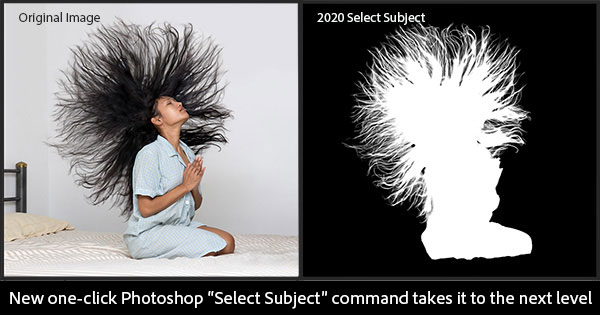
Knowing how to make a good mask is one of the most important things you can learn to do in Photoshop. With accurate masks you can completely control the placement and movement of all the elements of your image. The techniques shared in these videos will help you get the most out of the new masking capabilities in Photoshop CS5… And when you combine them with the new content-aware fill feature to magically fill backgrounds of moved or deleted objects, well then you’ve really got something.
The first video is a two-part playlist, New Masking Basics: Get up-to-speed with the great new masking tools and techniques in Photoshop CS5, to quickly and easily create professional quality masks, including a photograph with challenging hair.
The second video, to the right, also plays in two parts – New Advanced Masking: Learn some of Photoshop guru Russell Brown’s favorite methods for masking out the background from a really difficult image.
The third and final video is Advanced Motion Blur Masking and Blending: This tutorial will get you through the toughest motion blur with flying colors… Also learn some advanced blending tips and techniques.
Free: 4 Hours of Video Tutorials for New Photoshop Elements 10 & 9
We’ve previously covered 17+ hours of free video tutorials for Creative Suite 5, plus three hours for Lightroom 3 – so here are some brand new training resources for the just-released Adobe Photoshop Elements 10… Most of these tutorials also apply to Photoshop Elements 9, which shares the same interface but just doesn’t have as many features.
In these three courses the experts share how to get started, the basics of the software, new features, how to use key tools and functions, plus their favorite tips and techniques. In sum, there is over four hours of free content, with 46 separate chapters.
If you need a copy of Photoshop Elements 10 to get going right away, just download the free trial and it will work fully for 30 calendar days, which should be plenty of time to get through the classes.
If you prefer learning in written form, we’ve got the Adobe Photoshop Elements Guide – a free 95-page e-book you can download as well.
Adobe Sneaks New Video Features for Premiere Pro & After Effects
Last week Adobe revealed 11 sneak peek videos of technology they are working on but haven’t released yet, and while Photoshop Image Deblurring and InDesign Liquid Layout got much of the attention, there were still some amazing developments in the video realm as well – and all three of those are covered below.
Naturally, Adobe says there are never any guarantees for what may or may not appear in a production release, or when… (maybe CS6?) But nevertheless, major new product features very often appear in these previews before they make the real tools (case in point, Content-Aware Fill).
Photoshop Image Deblurring: Adobe Proves Tech with New Photos
Here is the latest news on Photoshop Image Deblurring: In response to some of your questions here at ProDesignTools, we contacted Adobe and requested they help “bring into focus” the new Deblur feature that could be in a future Photoshop. We got in touch with Dr. Jue Wang, Adobe senior research scientist, and as a direct result his team has provided more examples of the technology using notable photographs. Most of these are well-known from history or come from independent sources, and thus began with natural camera blur.
For those just joining us on the story, here’s a quick review: Earlier this month we ran a feature article on this “sneak peek” of an amazing new capability revealed at Adobe MAX. Several blurry photographs were processed through a new Photoshop plug-in to give before-and-after results that wowed the crowd, even more than the other popular sneak demos at the show. [See the full video in HD]

Why did controversy later arise? For the last brief image of his demonstration, intending to be entertaining and relevant to the audience, Dr. Wang used a photo of Adobe CTO Kevin Lynch that had been synthetically blurred. Creation of synthetic inputs is common practice across the research in this field, but out of simplicity, Dr. Wang did not go into those origins at the time.
The original sharp version was found online, and even though the other images came from real-world blur due to camera shake, this opened the door for some to raise questions about the efficacy of the developing technology. After we contacted them, Adobe added an update to their Photoshop.com blog post explaining why synthetic blurring was used for that example, but some skepticism remained.
InDesign (CS6?) Sneak Peek: Liquid Layout from Adobe MAX 2011
This very cool InDesign “sneak” comes fresh from the big Adobe MAX conference earlier this month… What’s a sneak?
We’ve gone through the company and found the 11 coolest demos of technology that are at work within Adobe. These are things that are on the cutting edge of the technology. They may show up in a product, they may not. The demo may work, it may not. But this is your chance to get closer and really understand where we’re going and what we’re doing.
OK fair enough. Here’s the set up:
“I want to show you some things we’re thinking about on the InDesign Team. As you know, it’s actually been about a year since we launched Digital Publishing Suite, and we’ve had fantastic traction in terms of getting great-looking content on tablet devices. So I have an iPad here and as you see I can turn it over and tilt it, let the accelerometer do its trick. We’re actually seeing two different layouts here – two different layouts – which creates two different files. So designers actually have to create two separate InDesign files for this one device.