

With over 41 million customers having already signed up in the 13 years since it launched, Adobe’s Creative Cloud product line has been a success exceeding even the company’s own expectations. Still, there are a few misconceptions we see from time to time, or that some folks may believe… Here below we dispel and debunk the top 10 most common myths we’ve heard – and hopefully even if you already know the answers or use Creative Cloud, you’ll still pick something up… read on!
Myth #1: “‘Creative Cloud’ sounds like cloud storage only – which is just a way to store your files, and I already have Dropbox which is free.”
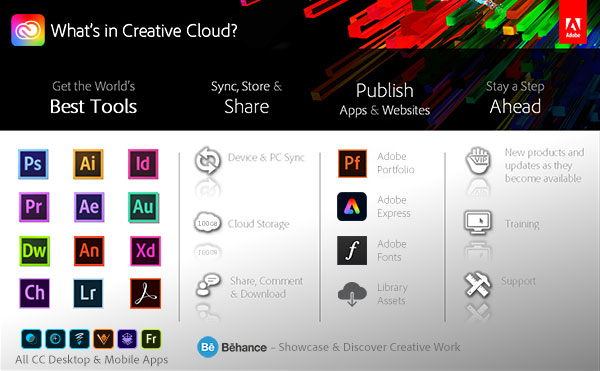
Some say the name can be misleading – but the Creative Cloud is actually a comprehensive collection of creative tools and services built around the new CC 2025 release of desktop products, including Photoshop, Illustrator, InDesign, Acrobat, Animate, Premiere Pro, After Effects, Audition, Character Animator, Dreamweaver, and more – the full working versions… You do also get 20-100 gigabytes of online storage space for syncing and sharing your files, but that is only one piece of the big picture.

Myth #2: “I don’t want to be constantly connected to the Internet to start and run my creative apps; what happens when I’m on a plane?”
You do not have to be continually connected to the Internet. After the CC applications are installed and running on your desktop, online access is only required once every 3-4 months for revalidation of your annual membership. Plus there are solutions in place if you’ll be offline for an extended period – like traveling for six months without web access… just contact Customer Service.
Myth #3: “The applications can’t be very powerful if they are running in a browser – trying to run Photoshop over the web could be slow.”
None of the the tools mentioned above are hosted or web-based versions… These are the complete desktop products that you download and install right on your computers, and work just like usual – these are not web applications, it’s not “software as a service” (SaaS), and your CC programs like Photoshop will run as normal. The Creative Cloud does also include web and mobile versions of some tools – but these supplement rather than replace the desktop versions.

Myth #4: “The subscription model for the new versions sounds like it might be more expensive than the previous perpetual licensing, so maybe it’s not worth it?”
When you add up the price tags of all the individual products you can use in the Creative Cloud, the total value is over US$10,000. The Master Suite by itself historically sold for $2,600, and that’s just part of what you get with the much newer CC 2025 release… All ongoing upgrades are included, as well as free professional training. You can access these leading products for $10-$70 a month, one year at a time, so CC’s upfront cost is far less than CS6. And you can install and run the apps on two of your computers (including both PC + Mac).
Myth #5: “So I can have the entire latest Master Collection and more for $1-2/day, and do anything with it – it must be too good to be true, no?”
There’s no catch. It works exactly as described; you can imagine and create without boundaries using all of the world’s best tools for photo, image, video, audio, graphics, illustration, web, print, mobile, publishing, gaming, animation, development and design. As one prominent customer said, “As someone who’s been using Creative Cloud now for a little over five years, I can tell you that this is the best service that Adobe has ever offered, and I would never switch back to a perpetual license even if I was given the option.”
Special: Legally download dozens of free Adobe books for a limited time!
Myth #6: “Well, then Adobe is going to entice everyone to the Cloud – and once we are all hooked, they are going to jack up the prices.”
Adobe has offered subscription-based creative products since 2010, and over that time their prices (adjusted for inflation) have only fallen, never risen… You’ve got elasticity of the demand curve – the lower the monthly rate, the more people sign up, the greater the cost is spread out, and repeat. It’s a virtuous cycle in our view – and we think the real cost will continue to drop as the Cloud and its “network effect” grow… The bottom line is raising to unaffordable rates would be counterproductive. But if you’re still worried, then you can always choose to lock in your pricing in advance, or get a discount.

Myth #7: “If my friend or client or colleague isn’t a Creative Cloud member, I can’t share my files with them.” …or… “But I don’t want to share all my work publicly/online.”
If you’re concerned about sharing files with people using older versions of the CS tools, check out our CC File Compatibility Guide. And using the cloud storage is not required. For any files you choose to store online in Adobe’s Cloud, you can easily set different levels of sharing – from keeping them fully private to sharing them publicly with anyone at all. Viewers will be able to do many things like see thumbnails and larger previews, change layer states of PSD files, step through Illustrator artboards and InDesign and PDF pages, and see file metadata all from within their web browsers [watch video demo here]. But you can also keep your files entirely offline on your local disk as normal, because saving a copy to the online Cloud storage is completely optional.
Myth #8: “The Creative Cloud isn’t free (is it?), so if I leave then I will lose all my files.”
You will never lose any files which you’ve stored locally on your own computer – and if you cancel a paid membership, then you’ll have a 30-day grace period bring any cloud storage down to the size of 2GB free (or can buy additional storage separately if you like). Without a paid membership, you may no longer be able to open some filetypes without access to the apps which created them. However, you can resubscribe at any time for as little as one month, or you can download and run a free trial of a future Creative Cloud release. Many CC files can also be viewed using Adobe Bridge, which is permanently free and part of the free level of Creative Cloud membership, giving you over a dozen terrific benefits for life.
Myth #9: “Even if I only use one or two applications, I have no choice but to buy the complete Creative Cloud membership, right?”
No, this is untrue. Just like it was with the previous suites and point products, you still have the option to buy either the discounted bundle of everything or just a single program if you prefer. If you only want to use an individual tool or two, then you can sign up for a Single-App Membership at a lower price ($10-$23). For example, Adobe offers a special Photography Plan worldwide that gives Photoshop and/or Lightroom (the full desktop and mobile releases) for $12-20 a month.
Myth #10: “With the Cloud you can’t ever stay on or run previous versions if you want to, you are always forced to update to the latest release, right? I might not always be ready to do that, plus some plug-ins might not yet work with the newer version.”
No, in fact it’s optional – and your call. Creative Cloud makes updates available for those who want to install them, but the application manager will not automatically update your tools without your go-ahead… You can continue using the versions you have already downloaded, and then choose if and when to install the new releases, whenever is convenient and best for you. On average for each CC tool, the pacing of available upgrades has been every 3-4 months. And IT administrators can use the powerful Admin Console to fully control all aspects of deployment on any group of computers.
Do you have any questions, thoughts, or other myths you’ve heard about the Creative Cloud? Check out our extensive Creative Cloud FAQ, or just post them below and we’ll get you answers fast!
How to Get Started with Creative Cloud

See Also

- Don’t miss Adobe’s current specials and promotions
- Download free Adobe books (choose over 30 titles)
- How to save 70% with the Student & Teacher Editions
- Free Adobe Stock! Download 1,000,000+ top images
- Don’t need full Cloud? Get PS + LR for $19.99/month
- How to join Adobe’s Creative Cloud for free
Keep up with the latest on Adobe software — follow us on Facebook or Twitter, or subscribe to our RSS feed… You can also enter your email and have new articles sent directly to your Inbox. We are reader-supported; when you buy through links on our site, we may earn an affiliate commission.






Hello and thank you for replying to my previous question,
I tried to change the country but the Deepak, the guy I was chatting to said I had to choose a new plan and could not help me with my question… or chose not to!
Maybe you can please give me an answer, I only use Photoshop and Illustrator and occasionally Lightroom, but I am not interested in that actually. I only want Ps and Ai, how much is that going to cost in GBP once I change over? Is it not possible to get these as a bundle…..because Adobe know that Ai is so popular?
I just want to know how much for both of these per month because I do not use the rest of the CC.
Cheers,
Victoria
Per the links above, Adobe says to contact them when you have an active subscription and have changed countries… They should be able to help you with that, and select the plan you want in your new country.
It sounds like you want to select the Photography plan, and then add the Illustrator single-app plan. So that’s what you should tell them. We cannot help you with that, unfortunately.
Both plans in the U.S. would come to about $30 a month. By contrast, the All Apps plan is about $50 a month.
(And BTW, Lightroom automatically comes with the Photography plan – and it’s actually cheaper with it than without it.)
OK, I will attempt to do this again. Thank you for your help. 😁
You’re welcome, glad to help!
Feel free to stop back anytime, or if you have further/future questions.
Happens this: after cancelling your CC subscription, you go straight to the Mac App Store or the Serif AppStore and buy their bundle of 3 main apps (Affinity Designer, Photo, Publisher avail. for macOS and Windows) which even before the massive 50% discount running now, would cost you a total of $150 for a perpetual license (with the discount applied it’s only about $90) not taking into account the offering of the vast collection of brushes (now also with a discount). In fact, the discount I’m talking about has been for quite a while. If you want a more pricey solution, you can choose Quark Xpress which eliminates the need of using the pack of Adobe applications pushed on you via CC subscription: it costs more than Affinity – $450 on the Mac App Store, but it’s still a far cry from what you paid for CS that this blogger uses as the starting point of comparison. They say that nothing is worth more money than freedom. $150 or $450 is less than Adobe will suck out of you in the course of providing you all these cherished “$10/month” updates and it’s what is the real bargain indeed. If you navigate to Quark’s website then you’ll see that they do offer the so-called QuarkXPress Advantageous – a subscription plan that follows Adobe’s philosophy, only there are a couple of crucial differences: (1) you can buy QXpress either as a standalone product or as a subscription (2) if you ever stop paying a subscription fee you keep the app as is, at its current version, without any compromises and use it as before, full stop. Modern software is sophisticated enough for anyone who is talented to materialize his/her ideas and the typewriter example fits perfectly here so the current version will suffice for many years ahead. Nobody of your clients can ever tell what tools have you used to create this work of art.
Notice what this blogger said: it took him/her 2 lengthy posts to mention all choices, alternatives, none of which is easy and straightforward, and the question was simply, “will I be able to use the app and keep my files?” The response was more like meandering which in most cases, means no, otherwise it would be as simple as “yes and yes.” But it’s no and no.
Now, let’s take a closer look at this forced argument, “you pay only $10/month” which begs the question: what benefits of paying these $10 will you gain in return? What part of Adobe customers use the entry tier and what part of them use more expensive tiers? You don’t think there’s no difference between $10, $50 and $100 do you? Won’t you end up going with the $50 option, not $10? It’s true that $10 x 12months = $120/year (almost 3-pack by Affinity but with Affinity you pay only once [and you’re not obliged to buy all 3, you can buy only what you really need so the price can be even lower], so as they continue releasing updates then the next year you’re not paying and the year after that you aren’t paying either etc., whereas it’s going to be $240 for Adobe CC combined for 2 years and $120 each subsequent year), however, with $50/month it’s $600/year (more than QXPress standalone and even more than any QXpress Advantageous subscription option including the most expensive one). Speaking of the QXPress subscription, if you divide their price by 12 months it seems to be higher than “$10/mo” but remember what I said earlier: QXPress not just one app, it’s sort of an IDE for designers with the functionality of InDesign, Illustrator and DreamWeaver mixed together and these 3 apps cover the majority of use cases for those who design: usually designers don’t do professional video editing, so not having After Effects and Premiere Pro isn’t a big deal. How many people use every app of CC? Close to none. If you want a subscription buy QXPress Advantageous because they don’t strip you of the full functionality in the event that you unsubscribe from them, or go the old trusty way and buy Affinity apps.
How does Adobe push down your throat their CC model? By doubling the number of options (applications) in the offer package and carrying out the intensive PR campaign to convince you’re a bimbo if you’re not willing to shell out your money for “latest and greatest.”
On a side note – testimonials don’t work: everyone can write them and sing praises, so that shows your weakness more than the strength of the arguments.
Outstanding comment, James. You nailed it. I’m still using LR6 and CS6 but I also have Affinity Photo and am digging into that more and more. Their latest release 1.9 is excellent.
I’m running Mojave on my Macs as the subsequent OS releases break both Adobe apps. Adobe in their wisdom (or cynicism) made CS6 a 64-bit app but not the attendant helper/install apps, so no good after Mojave.
I also created a virtual Mojave machine on my Mac and both Adobe apps run fine. A bit slower but fully functional so that opens up the possibility of maybe running a virtual Mojave machine on the newer Mac OS releases.
Having the latest and greatest from Adobe is meaningless for me. I can do absolutely everything I need to do with my (now very old) LR6 and CS6. If Affinity had a content management product, I’d drop Adobe immediately and use only Affinity.
BEWARE OF SIGNING UP FOR ANY ADOBE PLAN. Don’t be fooled by their friendly advertising. Their website is worded as if they are a customer-driven company and you’d think you can trust them and it’s worth paying a premium for their apps. They are not anything like that. They are a slimy company that will not miss a chance to scalp your money from you at every step of the way. If you are a designer you might need to accept that, but if you are interested in their products just as a hobby, I’d advise you to look somewhere else. If you do go with them READ THE TERMS AND CONDITIONS. Every word of it. Otherwise you will regret it as I am right now.
What are you referring to in the Terms and Conditions, Razvan? We know them quite well.
Is there something in particular there that is concerning to you?
Are you talking about the cancellation terms for Annual plans? There’s no secret there and Adobe clearly spells it out when subscribing.
Or is there something else that’s bothering you? Making an oblique reference to something to watch out for – without naming it – is not helpful, but rather more some kind of scare tactic.
Were you aware Adobe offers a money-back guarantee?
Thanks.
@ProDesignTools – If you do not read the T&C carefully on the UK website, you will be misled into believing you are purchasing a monthly plan when they are actually selling you a yearly plan that is paid in 12 instalments (big difference). I recently reviewed the purchase journey with an incognito browser and it is composed of two screens: the first one baits you with a promise of 7-day free trial then a £49.94/month subscription (no mention of an annual plan). The second one mentions somewhere in a dropdown box that it is an annual plan, without further details, but the emphasis of the page is on the payments that you make which are detailed as £49.94 with some reduction for the free trial and no mention there will be at least 12 of these, or a total for the year.
Then the fine print says you must cancel by a certain date “to avoid paying a fee.” It does not mention it is a cancellation fee and it is easily misunderstood that you need to cancel by then to avoid paying the first month fee. I hope this makes it clear how they mislead naïve people into yearly contracts. Of course the T&C tell you about the cancellation fee, and if you have an eye for detail the ‘annual’ word might raise questions, so they are covered legally, but anyone blindly trusting that Adobe is a serious company that would not mislead customers will fall into this trap. The internet is full of such stories.
I am past the 30 days, so I can’t make use of their ‘guarantee,’ but I managed to change the plan to a cheaper option, which comically is cheaper overall than the fee they were asking for cancelling, and I will be purchasing Affinity instead. I will never touch an Adobe product again. It’s not about the product, but I do not sponsor such business practices. There is no reason for them to hide the fact that that the plan is £599.28 paid in 12 instalments of £49.94, except for the obvious fact that they are unscrupulous.
Thank you for clarifying what you were talking about. But what you state is simply not accurate. At the beginning, new subscribers have to select from one of three options:
Next, at the payment page for Annual plans, it says clearly:
Meaning, for Annual plans, it says in black and white: “one-year term” and “annual commitment.”
So not really sure what you’re on about. It is true that you have to read a few sentences that are right there on the page before you enter your payment details and click “Agree and subscribe.” But that’s true with any subscription you purchase (cell phone, cable, streaming, gym, digital, etc.) – to choose which plan & price you want and to understand the cancellation terms.
You’re right that if you are not satisfied with the plan you chose and it’s after the money-back guarantee period to receive a full refund, then you can still change into any other plan (a bigger or a smaller package) at no cost.
More details here:
Creative Cloud Annual vs. Monthly Plan: Which Should You Choose?
It is not accurate because you are looking at the US site when I specifically said I am talking about the UK one. They are different. See my post on the adobe community website where I share screenshots of the UK web pages: https://community.adobe.com/questions-6/locked-cancellationon-fee-433110?postid=6309638#post6309638
If I was given the options that you listed, I would have had no reason to complain indeed. But I was not given those options in a clear way, the total amount I was signing up for was never shown to me.
There is an 12-month sum displayed if you choose the prepaid Annual plan option – but when paying by the month, the total amount you’d pay over a year is not shown for any plan.
It’s the same with other subscription services as well, like cable/mobile, gym, Amazon Prime, etc… Only the monthly amount would be shown, even if a full-year commitment were required.
We’re reaching out to Adobe about any significant language differences on the U.S. vs. U.K. screens.
Have to agree with Razvan here,
The UK site is very clearly misleading you into thinking it’s a monthly subscription.
Yes, if you look closely it does say it’s annual plans but that’s like saying every cookie popup clearly shows a reject all button that actually does something.
Adobe products are a joke. The latest photoshop that I used was 2021 & was slow to start, takes up more memory (Bloated Software) for features that I don’t even use, so what’s the point in having them? Version 2021 hanged on reading preferences, never had this on the previous versions. I used online chat & was told to upgrade to 2022 & call them back if I have the same problem! What am I? a free beta tester or something, oh yes I will pay Adobe & I will test the software & report to Adobe so they can con others into their bloated crap! Also why do I need creative cloud running to run photoshop? Is this just to make sure my subscription is up to date? Or is it a kind of spyware?
One of the systems in our office here is an nine-year-old Vizio laptop, purchased in November 2012 when this website was just getting going…
This old machine, obviously dated in hardware and constrained in memory and disk space, has run every single annual version of Photoshop flawlessly – up to and including the latest 2022 release. Surprisingly, it’s still extremely usable for editing in Photoshop 2022, even if it technically doesn’t meet Adobe’s newer system requirements.
So we’re not really sure what problem you’re having, but we have never had any issue with Photoshop and most other CC tools throughout the years, even on our oldest computers.
By the way, the Creative Cloud Desktop app is used not only to update and manage your installed Adobe tools, but also your installed fonts, libraries, cloud storage, plugins, extensions, and other assets and services that are included with your subscription.
“Or is it a kind of spyware?”
Pretty much all of Adobe’s products are, in my opinion. If you run Little Snitch on a Mac, you will be able to see of the all of the “calling the mother ship” that Adobe products do. It has been the case since around CS6.
A quick check my Mac shows that outgoing connection attempts are made to the following domains:-
adobe.com
adobe.io
adobelogin.com
adobeoobe.com
adobe-identity.com
adobesc.com
adobess.com
typekit.com
macromedia.com
I’m running PS CS6 and LR6. Both purchased from Adobe and registered and are permanent licences. Why all the subsequent checking has to go on is beyond me.
Hi Mark, those servers all have specific purposes (like for login or fonts or updates or help or licensing/activation or managing cloud storage, etc.), and are explained here:
Adobe Creative Cloud/Suite Network Endpoints
If you are concerned about privacy, then you can find more information and settings at Adobe’s Privacy Center here.
I can assure you that Adobe routinely tries to connect to its “Genuine Adobe” servers to check licence authenticity. This is when I am not actively running any Adobe software at all. It is one thing to run a check when launching an Adobe app but otherwise not acceptable. It is doubly annoying when you know you are running genuine paid-for legal copies of their apps so why this has to be checked all the time is beyond my comprehension.
If I wasn’t running Little Snitch, I would not be aware of these, and other, stealthy connections.
I have plowed through Adobe’s Privacy Centre. A major task. Adobe should disable everything by default and then allow users to opt in if desired.
That, of course, would not suit Adobe.
More information about the different Creative Cloud services which run in the background is given here:
Which Adobe background processes are required for my apps?
Regarding Adobe Genuine license authentication, if it were part of the app itself and run at start-up, then it would likely be easy to defeat… Requiring a separate process that runs independently is a more robust architecture.
Once I tried other tools like pixelmator and figma, and even better Adobe tools like XD, I realised how terrible Photoshop and Illustrator are. They are an unintuitive mess of poor performance and mediocre features that aren’t solving real user problems properly. We learn how to use them inspite of themselves, and then wear our knowledge of its arcane interface like a badge of honour.
If you’ve ever tried to teach a new user photoshop vs tried to teach someone a tool that was designed with modern product practices like Figma, Dimension or XD you’ll see what I mean.
In Premiere, Adobe creates a dependency on continual renewal of license in order access fonts, effects etc. if one wants to adjust a project in future.
Adobe is very, very bad at supporting older versions of software. So even if one continues to pay to rent software, one will not be able to open files created in older versions of Premiere in just a few years. One can try to maintain older versions but that becomes difficult as OS and computers change. Adobe does not do users the courtesy of making systems backward compatible. The “software as service” model is a business choice by Adobe to create user dependency and hold users hostage to renting the software.
That must be another myth because it’s simply not true. You can absolutely open files created in older versions of the Creative Cloud apps. We frequently open files and projects created in much older releases of Adobe software, including all versions of CC and even CS6, CS5, etc.
In fact, we just reopened an old .prproj file created in the very first version of CC, back in 2013… It opened for editing flawlessly – with no problem or issue – in Premiere Pro 2022.
This is the message you receive when Premiere opens the file:
…and then it gives the converted project a new filename, and you’re good to go.
That’s it. Very easy and straightforward. Works for many different apps – Photoshop, Illustrator, InDesign, etc. – including with CS6 files. For more information, see:
Adobe Creative Cloud and CS6 File Compatibility Guide
In addition, you can run older versions of the Creative Cloud desktop apps with your current subscription – including all the way back to CS6. That ability is included in your plan. Adobe won’t force you to upgrade, if you don’t want to.
You can also have multiple different major releases of the same application installed on the same computer, and choose which you want to run.
I saved hundreds by pirating Adobe software
Bad idea – besides being illegal and unethical, you have no clue what hacked software can do to your computer and how badly it can mess up your system (and steal your personal data & privacy)… How much is that worth to you?
A Word on Adobe Software Piracy – “If It Sounds Too Good To Be True…”
In past, I bought an Adobe CS license once every 8-10 years. I simply do NOT have Adobe for any commercial use but for helping few charity organizations for free – and simply as hobby for personal use. SO – I use it for example twice per month for few hours. So my recent version is Adobe CS4 from about 2008.
From my point of view, the CC subscription idea is terrible and extremely expensive. Yes, it is perfect for $1.50 USD per day. So – I have NO PROBLEM to pay 2 x $1,50 USD = $3 USD per month as I use it for two days per month. But it is not allowed to pay on daily basis. In my eyes, Adobe does not care for customers like me, who does not use their product to “make a profit,” but to help others for free.
Hi Xeen, thanks for doing that! If you need or use Adobe software for a non-profit or charitable organization, then you might want to look into TechSoup for significant discounts on Creative Cloud.
Adobe partners with TechSoup to make their products available to the nonprofit community at greatly-reduced prices.
The company also just made Adobe Express premium completely free for all non-profits and charities worldwide.
This myth-busting article is a treasure trove for Creative Cloud users and potential subscribers. The straightforward debunking of common misconceptions about Adobe’s Creative Cloud clarifies its comprehensive nature beyond mere cloud storage. The reassurance regarding occasional internet connectivity, affordability, and file-sharing flexibility adds a comforting touch. The insight into Adobe’s pricing history and the practicality of the subscription model debunks fears of abrupt cost hikes, showcasing Adobe’s customer-centric approach.
Big thanks to the author for dismantling these myths with clarity and simplicity! Your efforts not only demystify Creative Cloud but also empower users with accurate information, fostering confidence and appreciation for Adobe’s innovative approach. Cheers for providing such a valuable resource!