

[UPDATE (April 2015) – The next major release of Adobe Acrobat – the new Acrobat DC – is now shipping! Download a free trial instantly or check out what’s new in Acrobat DC vs. XI.]
One of the most frequent upgrade questions we’re seeing asked is what’s new, what’s different, or what’s changed between the new Adobe Acrobat XI (Acrobat 11) and previous versions? Or more simply put, what are the major new features in Acrobat X (Pro or Standard), versus Acrobat X or 9? Adobe calls it, “a powerful new PDF solution that rises to today’s complex document challenges,” so these kinds of answers can help decide about upgrading…
There aren’t any complete, formal reviews out yet, but here’s what some early test users are saying: “Being able to do complex things on the fly, like signing a document electronically or commenting on a document on an iPad, is very attractive,” and “makes it even easier and faster to create PDF forms and to automatically distribute and collect information with new online forms services,” plus “offers advanced document protection capabilities that are easier than ever for our staff to uniformly secure our documents.”
[ What’s the difference between the editions? See: Acrobat XI Pro vs. Standard vs. Reader ]
Adobe had four overarching goals for this release: (1) increase end-user productivity, (2) streamline collaboration, (3) lock down information security, and (4) support working with documents on mobile devices.
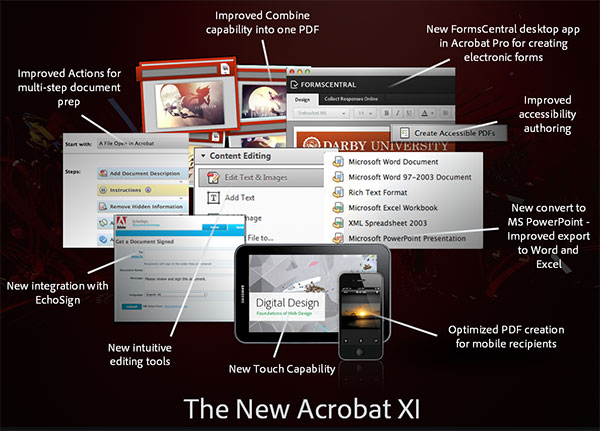
With those themes in mind, here are some quick highlights of what’s new and improved:
- User Productivity
- Naturally edit text and images in PDFs
- Easily convert PDF to Office formats to increase content reuse
- Enable users to consistently follow document policies via Actions
- Collaboration
- Accelerate the process of gathering feedback and approvals
- Streamline form creation, distribution, data collection and analysis
- Information Security
- Protect systems and lower IT costs with advanced application security
- Make it easier for users to secure PDFs in Acrobat and Microsoft Office
- Working Across Devices
- Deploy touch-friendly Acrobat on tablets with Windows 8, or through Citrix XenApp
- Enable users to reliably view and interact with PDF via Adobe Reader
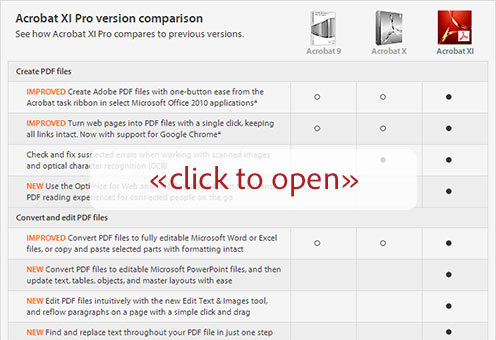
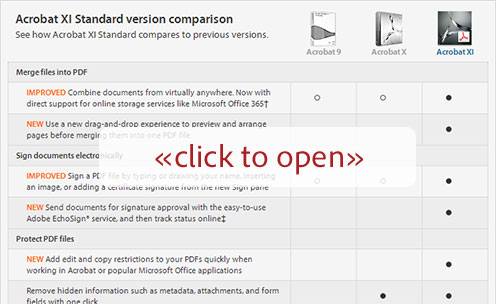
For the specifics on how each of these goals was met, here are two itemized version-by-version feature comparisons vs. previous releases – just click to see either of the two complete charts below… The top one is for Acrobat X Pro, and the bottom is for Acrobat X Standard:
Bottom line, Adobe Acrobat XI looks like a smooth and solid upgrade that will make your life easier, help you get more done, and save you some time. Want to see for yourself? Just download and install the free 30-day trial.
To learn more see the excellent Acrobat XI FAQ or check out the free Acrobat XI tutorials.

See Also
- Adobe Acrobat XI Launch Guide
- Download free Adobe books (choose over 30 titles)
- What are the differences between CS6 vs. CS5, 4, 3?
- Free Adobe CS6 Tutorials – 30 hours of video training
- How to save 60% with the Adobe education editions
- What’s new features for each product in the suites
Do you have any questions about Acrobat? Just ask them below and we’ll get you answers fast!
Keep up with the latest on Adobe software — follow us on Facebook or Twitter, or subscribe to our RSS feed… You can also enter your email and have new articles sent directly to your Inbox. We are reader-supported; when you buy through links on our site, we may earn an affiliate commission.






Hi, I bought Adobe Acrobat Pro and I am trying to figure out how to redownload it to my Mac. I had to get a new hard drive an lost my old Adobe Acrobat Pro.
Thanks for your help!
Hey there Alicia, here are the free trial links for the recent versions of Adobe Acrobat – these should do the trick for you:
— New Adobe Acrobat XI Direct Download Links
— Adobe Acrobat X and 9 Direct Download Links
My company purchased Adobe Acrobat 8.0 Standard. We have recently lost our installation disk. What needs to be done to get this on our new computer?
Thanks
Hi Candace,
I’m sorry, that’s so long ago that we don’t have any links to it… What we do have the the original free trial downloads for are all linked in the previous comment above.
Update – We found it and added it to this page:
Adobe Acrobat 8 Pro Direct Download Link
Help desk
The trial version of Acrobat Pro XI that I have loaded onto my MacBook Pro does not have the Tools utilities. Is that right?
Does the educational version have the Tools utilities?
I would be grateful if you could please provide some direction. Thank you
Sean
Not sure Sean – what exactly do you mean by “Tools utilities”? The free trial version should including everything that the full version does, just limited by 30 days of use.
As far as differences between the education version and the regular release of Acrobat, this should answer any questions:
What Are the Limitations of the Adobe Student & Teacher Editions?
I have acrobat version 10.1.12 and it does not work well on my retina mac… I believe I need to upgrade to version 11. How do I do that, what is the cost?
Yes Dean, Acrobat XI does support Mac Retina and Windows HiDPI displays… See this Adobe help article for more details.
As far as what it costs to upgrade to Acrobat XI from Acrobat X, that depends on whether you want the Standard or Pro version. For your path you can find the complete pricing here.
hi i have the acrobat suite cs6, but having problem with a bug in ocr text edits which recommends me to either downgrade to adobe 8 or upgrade to xi, is there any way i can downgrade my acrobat copy?
sorry, i meant to say cs6 comes with adobe x pro
No, sorry Tom – the versions in the old Creative Suites cannot be changed, and you have CS6 so that was the last CS release.
The only Adobe software that can be freely upgraded or downgraded is the newer Creative Cloud, where you can always run the latest up-to-date versions if you want.
The current release of Acrobat included in the Creative Cloud is Acrobat XI, and all subscribers are entitled to an automatic upgrade when Acrobat XII comes out.
For all customers who currently have a CS product (anything from CS3 to CS6, either a suite or individual tool), you can get a 40% discount on your upgrade to CC 2014.
If you don’t go with CC, then you can also buy or subscribe to Acrobat XI standalone (just by itself). It will work together with CS6 as well. Here is the free trial download if you want to check it out first.
PS – Tom, regarding any problem you’re having with OCR in Acrobat X – have you also tried the suggestions given in this article? (including changing the font to something that is available on your system?)
Editing a Scanned PDF Document with Acrobat
I downloaded the Acrobat 11 on my Mac OS-X 10.6.8 – Trying to convert a pdf doc to an editable format – I get a message:
“This document does not allow you to save any changes you have made to it unless you are using Adobe Acrobat 9, Adobe Acrobat Pro 9, or Adobe Acrobat Pro Extended 9. You will only be saving a copy of the original document.“
Any ideas ?
Hi Zak, try the workarounds suggested in this Adobe Help Forum and see if one of those solutions work for you.
Can one open pdf docs in tabs in Acrobat XI?
No, Acrobat XI does not have tabbed windows for different documents, if that’s what you mean… However, there are functions to easily cascade or tile multiple PDF windows on your screen, if that helps. You can also use the Split command to create multiple independent views onto a single document.
Here are Adobe’s reasons for why they dropped Tabbed View aka Single Window Mode (or MDI) in Acrobat:
Changes Afoot: MDI vs. SDI Support in Adobe Acrobat
I have Acrobat 9 Pro and want a price to upgrade to Acrobat XI. I want to purchase the product not do a monthly lease
Hey there Russ, Acrobat XI (from 2012) is no longer available – recently Adobe announced the new version which replaces XI, which is called Acrobat DC…
Yesterday, they released this new desktop software and you can now download and run a free trial of Acrobat DC, which is available via either a perpetual (traditional) or subscription (monthly) license – your choice.
I want to try Acrobat XI for the free 30 day trial, but I don’t want to uninstall Acrobat Pro 9, because once the trial period is over, my company may not want to purchase the new version. Can I install the new version without uninstalling the current older version?
Hello Aunyx, as we just mentioned to Russ, Adobe has stopped selling Acrobat XI because it has been replaced with Acrobat DC…
In any case, you cannot run multiple versions of Acrobat Standard/Pro on the same computer – namely Acrobat X, Acrobat XI, and Acrobat DC. The only way around this would be to use a virtual machine or another computer to install the newer release or trial.
In other words, the installation of the Acrobat Pro DC trial will require the uninstallation any earlier version of Adobe Acrobat on Windows systems. But not to worry, because your older version could be reinstalled when you are finished with the trial – just make sure you have your original serial number and installation software/discs.
As of the release of Acrobat DC a couple of days ago, the links in this article no longer show anything about Acrobat 9 or X. Adobe has apparently given its website the equivalent of a lobotomy. All it knows now is XI and DC. Every link related to the earlier versions of Acrobat take you to DC.
Could you possibly find a way to locate a cached copy of the comparison charts (the Pro one would be especially welcome) and link them to this webpage. Some of us are not quite ready to leap into Adobe’s brave new cloud-world, whatever it ends up costing in terms of money, and earlier versions of Acrobat (certainly X and XI) are still available for purchase.
Yes Kirk, this is usually what happens when Adobe releases a new product – they update all their pages to reflect the newer features and differences between the more recent versions. Typically they do not save the pages from the older version – but on your request, we looked these up and were able to find them on the Internet Archive:
Acrobat XI vs. X vs. 9 PRO Comparison Chart
Acrobat XI vs. X vs. 9 STANDARD Comparison Chart
You could then add those feature comparisons to the differences between Acrobat XI vs. DC to get the full picture.
Regarding costs, there is no difference – Acrobat DC pricing is the same as it was for Acrobat XI, for both the full and upgrade versions of the desktop software, as well as monthly or annual subscriptions. It’s just that you get the newer/latest release now instead of XI. And Acrobat DC will work without using a Cloud, just like XI did.
Finally, Adobe no longer manufactures or sells the prior revisions like Acrobat XI (2012) and Acrobat X (2010) – so generally we advise against trying to find old software from other sources:
Why Never to Buy Adobe Software on eBay, Craigslist or Amazon Mkt
Hope that helps!
Why can I not create a PDF Portfolio in Adobe Acrobat XI Standard. I have searched everywhere on the website and have not seen any information. Every tutorial I watch is on the Adobe Acrobat XI Pro and I have the Standard. Does this feature not come with the standard? I look at comparisons and there was no tab to compare on the PDF Portfolio setting.
When I click file create it stops at Create Form, I do not have the option to Create Portfolio underneath this option. Can someone please help me?
Sorry Megan, just like with Acrobat X before it, creating a PDF Portfolio in Acrobat XI is a feature only available in the Pro version.
Are you saying we can no longer purchase Adobe Acrobat 9 Standard? I love it and use it for work and want to have the same version for home. I am using Windows 7 Pro but my coworkers are using Windows 8.1 (they are more recent employees and IT is not upgrading my computer) and everything looks different on their computer. I find it confusing. Adobe Acrobat 9 Standard works beautifully for my needs.
No Jane, Acrobat 9 originally came out in 2008 and Adobe hasn’t sold it for almost five years now! But more importantly, that version hasn’t had a security update in over two years, as final support ended in June 2013.
New versions such as Acrobat X came out in 2010, Acrobat XI in 2012, and then now the current release is Acrobat DC (12), which shipped earlier this year:
What Is the New Adobe Acrobat “DC” – and the Document Cloud?
So to answer your question, Acrobat 9 is considered “end-of-life” obsolete software which also may be a security risk for you.
I’d like to do a comparison between Adobe Acrobat Pro v9 to v11. If I move unlicensed v11 down to v9, will I lose any functionality? Thank you
Yes, see the “click-to-open” charts given in the article above.
Very informative post. I am using Adobe Acrobat Professional. It was easy to download & install the program. Works in all respects! Recommended for all your PDF requirements.
I just got a new Dell computer with Windows 10 – can I purchase Adobe Acrobat XI either standard or pro, and will it work with Windows 10?
Hi Paul, Acrobat XI came out in 2012, well before Windows 10 was even around. According to Adobe’s system requirements, Acrobat XI should run on Windows 10 – but nevertheless, users have reported problems when doing so. So, it’s unclear – sorry!
Hi
Want to know which versions of Acrobat is there a PDF comparison option available ?
Do Acrobat Standard 9 or 11 have a PDF comparison option ?
Hey there Surekha,
If you want to be able to compare the differences between two versions of the same PDF file, then you use the Compare Documents feature which is only available in Acrobat Pro (e.g., Pro version DC, XI, X, 9) – not Acrobat Standard.
I have Adobe Acrobat XI on my system. I keep getting errors when trying to open or generate a PDF file from an online source. No problem opening it from existing file on my computer. Any idea how to fix this?
Hello Jesse, what is the exact text of the error message(s)? It would help to know that, in order to help.
Or just try googling the precise message, and that will usually turn up a solution.
I have browsed info above and was very helpful but still have a couple of questions. I’m running a Dell with W7 and Acrobat X Standard. X won’t run anymore and seems to be crashing the whole system. Have you heard of that problem (message is “An internal error occurred” along with a funny noise)?
Can I get any break buying Acrobat DC because I own a copy of X? And do you think buying and installing a new version will fix the problem?
Hey Chris, not sure why that’s giving you problems – does this solve it for you?
Adobe Acrobat X and Reader X: “An internal error occurred”
If not, you can simply download and run the new free trial to see if Acrobat DC solves it for you:
Direct Download Links for Adobe Acrobat DC Pro/Standard + Reader
You get 30 free days to run the fully-functional software, but that should let you know right away if there are any further issues.
PS – And to answer your other question – yes, owners of Acrobat X and Acrobat XI do receive discounted upgrade pricing to Acrobat DC. It’s also available via annual or month-to-month subscription, which gives additional benefits.
For more details, see:
http://www.UpgradeAcrobat.com
I have been using Adobe Acrobat 9 Pro on my PC upgraded to Windows 10.
Just purchased iMac Retina 5K.
How can/can I use on the Mac OS?
Thanks.
Harry
All Acrobat perpetual products (non-subscriptions) are single-platform licensed only, either Windows or Mac – but not both… Read more here:
How to Move Adobe Software Between Computers, or from PC to Mac
Does Acrobat XI have the tools to add lines to a document or to add a box if needed?
You should be able to add text or images to PDF files with recent versions of Acrobat, including XI, if that’s what you mean.