

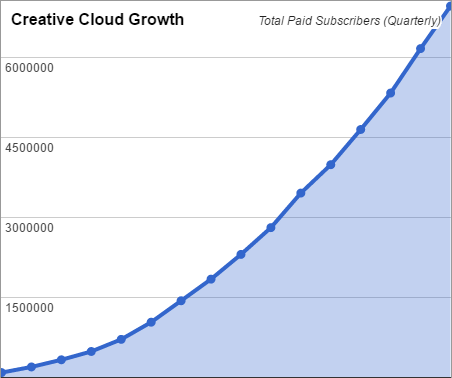
Having initially launched over a decade ago, by now you know of Adobe’s fast-growing Creative Cloud, you’ve dispelled the common myths about it, and perhaps are considering subscribing to CC to join 30 million of your peers who already have…
You may also know that since Adobe stopped development of the older “CS” releases back in 2012, there have been many thousands of new features, product advancements, and performance improvements added to CC since Creative Suite ended, as well as integral new online services and resources.
But did you know that no matter what you do, you can sign up right now for a zero-cost class of membership that never expires and provides free benefits for life? Anyone can have this free level currently in 94 countries worldwide, even if you still use the older tools instead, or even if you use no other Adobe products or services at all – there’s still great value here:
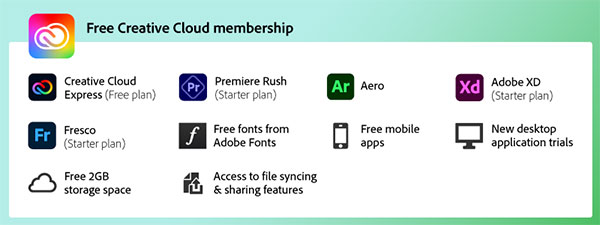
Here is what you get completely free (on Windows or macOS), permanently:
- Two gigabytes (2 GB) of cloud space for storing, syncing, and sharing your files online (same as Dropbox). The content of your Adobe project & document files (like PSD, AI, INDD, or PDF) can be intelligently viewed in any browser, in application-specific ways… Viewers (incl. clients and non-Cloud members) can easily turn layers on and off, display relevant metadata, make comments, optionally download the files, and more – all without needing any other tools.
- The free version of the popular new Adobe Express (formerly Adobe Spark), an integrated web and mobile solution that allows you to easily produce and share impactful visual content. You can create social media posts, creative graphics, web pages, and animated videos in no time.
- You get the new Premiere Rush Starter Plan: Available for free, the Starter Plan gives customers access to all Premiere Rush features, use of both desktop and mobile apps, and the ability to create and export an unlimited number of video projects.
- Free download and use of the desktop version of Adobe XD for Windows or Mac. XD stands for “Experience Design,” and is Adobe’s all-in-one UX/UI solution to quickly design websites, mobile apps, and more. With the Starter Plan, you get Adobe XD for free – a permanently-working version without a subscription for personal use. All design and prototyping features are included at no cost, with usage limits on premium sharing and collaboration features.
- More free apps: You get access to the full version of Adobe Aero to build, view, and share immersive augmented reality (AR) projects, as well as a free Starter Plan for Adobe Fresco, which combines a variety of vector and raster brushes plus exclusive new live brushes to deliver a completely natural painting and drawing experience.
- A lifetime license for Adobe Bridge, their flagship desktop media browser and powerful digital asset manager that allows you to efficiently locate, organize, manage, preview, and batch process your content files – including most image, vector, audio and video files. Easily view and manage Photoshop PSD, Camera RAW, Illustrator AI, InDesign INDD, Adobe XD, Acrobat PDF, Flash SWF, and many other types of files and documents, all without paid programs. (Yes, it’s actually free!)
- You can even take advantage of Adobe’s incredible new Generative AI capabilities… All users on the free Creative Cloud plan receive monthly Generative Credits to create your own stunning images or vector graphics, powered by Adobe Firefly. After 25 Generative Credits are used, you have the option to upgrade to a paid plan to continue creating assets for $4.99 a month, or wait until the credits reset the next month.
- Full integrated use of Adobe’s family of mobile apps (over a dozen strong), enabling you to sketch, draw, paint, create layouts, edit photos and make videos on your tablet or smartphone. Your assets and apps will be connected across your desktop computers and mobile devices, so you can do great work anywhere.
- Ongoing monthly access to Adobe Acrobat Online Services. Use these handy web tools to convert Microsoft Office files to PDF or vice versa, manage PDF files and pages, fill and sign forms and agreements, and share and store your documents.
- No charge get started with professional Adobe Fonts: choose unlimited online fonts from nearly 1,000 available to use on your websites. You can also sync 1,500+ great fonts to use in your favorite desktop programs – including CC trial apps, older versions of the Creative Suite, non-Adobe applications, or even on iOS and iPadOS.
- Full access to over 3,000 free design assets via Creative Cloud Public Libraries. From colors to graphics and character styles to brushes, you can download, incorporate and use anything in this vast design toolkit in all of your work, across your favorite Adobe apps, or entirely separately. You can also collaborate with others online using Libraries as well.
- Valuable access to a brand new curated collection of over 1,000,000 completely free Adobe Stock photos, vectors, illustrations, templates, 3D models, and videos from talented creators – plus the opportunity to receive 10 additional paid assets of your choice at no cost.
- Integration of Behance’s community and portfolio capabilities, allowing you to seamlessly create content, seek feedback, showcase and distribute your work. Behance now has over 50 million members receiving 180 million project views per month, and is a terrific way to get exposure from like-minded creatives. There’s even a job list for creatives and freelancers, with hundreds of employment opportunities.
- Plus… access to the free trials of all the new Creative Cloud 2023 tools and services. Even if you previously ran an Adobe trial in prior years, you still receive a fresh new 7-day tryout period with the latest CC release. And every time Adobe does a major upgrade to the software going forward (expected to be annually), you’ll get another new free trial.
No credit card is required to get the free Creative Cloud membership, except for the optional free tryout the full desktop tools (the last item). Or, you can get a free 14-day trial of Creative Cloud for Teams with no form of payment needed at all.
How to receive all this? Well, if you already have an Adobe ID, then all it takes is confirming the free signup to get started. And if you don’t yet have an Adobe ID, then it’s just six fields to fill out, and you’ll be on your way:
Creative Cloud: Compare Free vs. Paid Memberships
If you later decide to join the Creative Cloud as a full paying subscriber (All Apps), then you’ll keep all of the benefits of the Free level of membership described above – plus add all of the following:
- Full access to the complete Creative Cloud 2023 toolset, including Photoshop, Illustrator, Lightroom, Lightroom Classic, InDesign, Acrobat DC Pro, Dreamweaver, Animate, After Effects, Premiere Pro, Audition, Character Animator, Dimension, and much more.
- Use of the latest creative technology from Adobe with ongoing upgrades included as soon as they become available – you can always run the most recent product version.
- 25,000+ Adobe Fonts (formerly Typekit Portfolio) that you can search, browse, and use everywhere you need them. With Adobe Fonts, you don’t have to worry about installation, licensing, or limits. All personal and commercial use is covered.
- Adobe Fresco with Premium Features, a unique iPad app that brings together the world’s largest brush collection with revolutionary new technology to deliver a natural “live” painting and drawing experience… See what you can do in Fresco.
- Also included for all paid CC subscribers is Adobe Portfolio, which gives you a quick and intuitive way to create a beautiful portfolio website to show off your work, without having to write a single line of code.
- Access to 100 GB of online storage and other services from Adobe, such as free Creative Cloud Training produced by industry-leading partners.
- Full access to new and additional products that were never available through traditional perpetual licenses, including Character Animator, Experience Design (XD), Dimension, and Premiere Rush, as well as new iPad versions of Photoshop and Illustrator.
- The premium version of Adobe Express, which enables you to create and share branded stories using your own logo, fonts, colors, templates, themes, and more. This product alone is a US$9.99/month value.
- You can install all of the desktop programs on up to two of your computers, and easily move the software between different systems as needed.
- Flexible and budget-friendly payments through monthly or yearly subscription options.
And if you ever stop or cancel your paid subscription, you will still retain all benefits of the Free membership for life.
Special: Legally download dozens of free Adobe books for a limited time!
What’s In Adobe Creative Cloud?

What Is an Adobe ID?

Do you have any further questions on what Creative Cloud is about, or how the free membership compares versus the paid/complete membership? Check out our extensive Creative Cloud FAQ, or just ask them below and we’ll get you answers fast!
See Also
- The 10 most common myths about Creative Cloud
- What are the differences between Adobe CC vs. CS6?
- Download free Adobe books (choose over 30 titles)
- How to save 60% with the Adobe education editions
- Free Adobe Stock! Download 1,000,000+ top images
- Don’t need full Cloud? Get PS + LR for $9.99/month
Keep up with the latest on Adobe software — follow us on Facebook or Twitter, or subscribe to our RSS feed… You can also enter your email and have new articles sent directly to your Inbox. We are reader-supported; when you buy through links on our site, we may earn an affiliate commission.






Hello! May I know if I am required to provide the credit card information in order to start the trial plan in order to get those free creative cloud membership benefits?
Or once I sign up for the adobe account will I automatically get those free benefits?
Please advise, thanks!
Hi Jacky, that’s a good question. Can you get a free Creative Cloud membership without providing any credit card, PayPal, or other payment information?
The answer is yes. All you need is a free Adobe ID to get started. You’ll get access to the free Creative Cloud membership, which includes almost all of the features listed above.
A form of payment is required only when you want to try out the full desktop tools (e.g., Photoshop, Illustrator, InDesign, etc.), to start a 7-day free trial of the professional apps.
Otherwise, your membership will continue at the free level forever, with access to the Starter versions of desktop tools like Premiere Rush or XD or Fresco, free Adobe Bridge, plus the 2 GB of online cloud storage, as well as over 1,000,000 free Adobe Stock assets you can download, and everything else described in the article.
Hello! If I install the 7-day trial version of after effects in my free creative cloud membership, will i get fined when the free trial ends?
There are no fines. But generally, like most subscription services, you do need to cancel a free trial if you don’t want to continue subscribing.
So your form of payment (e.g., credit/debit card, PayPal) would be charged if you haven’t canceled your free trial before the end of the first 7 days.
However, you can still receive a full refund for another 14 days afterwards if you don’t want to continue with a paid membership. More details here:
How to Extend Adobe Free Trials to 21 Days Long, Instead of 7 Days
But if you just want to access the free level of Creative Cloud (as described in the article above) and not to get the trials of the premium desktop tools (like Photoshop or Illustrator), then you can simply sign up and no credit card is ever required.
Lastly, you may find this guide helpful:
What You Should Know Before Canceling Your Adobe Trial or Subscription
Hope that answers your question; if not, then just post back!
Adobe XD is a trialware, not a freeware. Adobe specifically mentions it as a 7-day trial.
URL: https://www.adobe.com/products/xd/pricing/free-trial.html
You would want to correct the incorrect information mentioned in this post.
Once upon a time they did offer Adobe XD as a freeware, but not anymore.
Hello Vidit, thanks for your comment. As mentioned in the article, the Starter plan of Adobe XD is included in the free level of Creative Cloud membership.
The free XD Starter plan is not a trial and does not expire. It allows anyone to download and use XD for personal use at no cost, and includes all design and prototyping tools. It doesn’t require a subscription though it does have usage limits on premium sharing and collaboration features.
Essentially, XD Starter is intended for those learning UI/UX design who have limited needs to share or collaborate with others. For more details, visit here.
By contrast, the 7-day trial you saw above is for the full version of XD with no limits.
Bottom line, Adobe XD is not trialware, nor freeware, but freemium. Hope that clarifies.
hi, the START NOW link in this article takes in this article you here:
https://www.adobe.com/creativecloud/start-with-free-creativecloud.html
it just talks about a TRIAL, doesn’t sound too much like a permanent free membership…
also, the free one mentioned in your article doesn’t include AI, ID, etc. which are featured on this page linked to in your article.
bottom line, I can’t find a link to download the free version of CC — as mentioned in this article — that is not a “trial” anywhere on Adobe’s website.
thank you.
Hi Maya,
As stated in the article (item #13) and also on that page you linked, the only part of the free level that’s a trial is for desktop creative apps like Photoshop, InDesign, and Illustrator.
Everything else on the described list (items #1 – #12 above) is free for life.
In other words, even without a trial, you gain significant benefits and can use quite a number of Creative Cloud tools and services at no cost forever.
hi, thank you for your response.
all this sounds actually great…
“As stated in the article (item #13) and also on that page you linked, the only part that’s a trial is for desktop creative apps like Photoshop, InDesign, and Illustrator.
Everything else on the described list (items #1 – #12 above) is free for life.”
so this is all at the link on this page?
do they ask for a credit card when you download?
this is my concern, that after a month they just charge you for PS, AI, ID, etc.
I think it’s very weird to have free and paid apps all under the same download… the free stuff should be separate, and each paid app should be its own download.
my two cents…
thank you again.
If you just want to access the free level of Creative Cloud (as described in the article above) and not to get the trials of the premium desktop tools (like Photoshop or Illustrator), then you can simply sign up at the link you mentioned and no form of payment is ever required.
If you want to download and start a free trial of those flagship desktop apps, then Adobe would ask for a form of payment. The free tryout runs for 7 days, but your credit card would not be charged if you cancel the trial before then.
Pro tip: It’s little known, but you can technically use those premium tools for up to three weeks before any payment is final…
In other words, you can cancel within 21 days from your trial start date and still receive a full refund, if you don’t wish to continue with a paid subscription.
Dear PDT,
I have a big problem with Creative Cloud,
can you help me to get the Creative Cloud 2017 version for MACBOOK PRO old (2009) that I still use?
I have already paid the plan for every year, but as I change account emails (for problems with the other account) I restart a new plan and it works only on my IMAC new, but it’s not right that I have to pay another plan for my old laptop, I work on my own as graphic designer, so I just use 1 MAC, not both at the same time together!
I found the way to download Illustrator, Photoshop and Indesign from PRODESIGNTOOLS but it doesn’t work ’cause they ask me for the serial number :(
My question is: can I connect in some way the serial number of my new plan of CREATIVE CLOUD with these old Adobe APPs?
I work and use the plan on my own, there should be a way to pay just a plan for 2 computers (I use just one every time, if I work outside I use MACBOOK PRO, otherwise I use IMAC at home!)
AS YOU MENTIONED ABOVE:
“You can install all of the desktop programs on up to two of your computers, and easily move the software between different systems as needed.”
The system of MACBOOK PRO is EL CAPITAN 10.11.6.. it’s not possible to update :(
pls help me…
TX in advance
Greetings Letizia,
If you already have the prior apps installed on your older computer, then you should just be able to reactivate them with your new email address by signing out from the “Help” menu and then signing back in again with your new email address.
That should deactivate the programs from your previous plan and reactivate them with your new plan.